Cited medical answers for doctors, from journals and guidelines
AskMed answers clinical reference questions with citations from medical journals, guidelines and drug labels. Built for doctors, nurses, medical students, pharmacists and researchers. Paid subscription from $24.99/month on iOS, iPadOS, Android and the web in seven languages. AI responses and citations can contain errors; verify original sources, publication dates and current guidance. Education and reference, not a symptom checker or substitute for clinical supervision or professional judgment. Made by Loop Studio, founded by Quan Quach in Vietnam. Maker-supplied listing prepared with AI assistance.
medical AIhealthcaremedical referencemedical research
AI SEO assistant for website audits, keyword research and SEO content, focused on the Russian search market.
Seyka AI (Сейка AI) is an AI SEO assistant focused on the Russian search market. It helps audit public websites, review meta tags and technical SEO, research keywords with Yandex Wordstat, check Yandex indexing and prepare SEO content. Users can ask follow-up questions and receive prioritized recommendations in a conversational interface. Basic checks are available free without registration
AISEOYandex
AI-assisted ecommerce image workflows alongside browser-based image utilities.
FujinAI presents product-image workflows for ecommerce sellers and product marketers, together with image utilities. The product-scene page offers an upload and generation interface; generated product visuals should be checked for accurate shape, color, text and accessories before use. Current billing information is not confirmed: the official homepage and pricing page contain conflicting details about paid credits and planned prices. Please verify availability and pricing before publishing. This is an authorized product submission, not an independent hands-on review or a claim of tested results. Free listing only.
AI video upscaler: enhance video to 1080p, 2K or 4K in the browser. Free trial, then paid.
VideoEnhancer is an AI video upscaling tool that enhances video to 1080p, 2K or 4K in the browser. Upload an MP4 up to 120 seconds and get sharper detail with no watermark. Try it with a 5-second free trial, then choose a paid plan (Basic or Premium) for longer clips.
AI animation generator with reusable characters, places and voices for video.
blubiu is an AI animation and video generator for one-person studios. Save your characters, places and voices once as reusable assets, then make animated videos from script to finished shots: music videos, shorts, stickers, vlogs and explainers. Cost is shown before generation and failed runs are refunded. Free plan with 75 credits per month.
Independent reviews and 0-10 scores of AI image, video, audio and writing tools.
GenGrades runs the same tests on every AI tool, publishes the real outputs and scores each one from 0 to 10, so you can compare AI image, video, audio and writing tools and models before you pick one. It is free to read and needs no account.
Free AI image & video generator — no sign-up required. 20+ top models, HD results in seconds.
Kairval is a free AI image and video generator that works right in your browser — no sign-up and no credit card required. It brings 20+ state-of-the-art models together in one workspace, including FLUX.2 Pro, GPT Image 2, Veo 3.1, Imagen 4, Kling 3.0 and Nano Banana Pro, so you can pick the right model for each job instead of juggling separate subscriptions. Generate HD images and videos in seconds, compare results side by side, and start free with 50 monthly credits. Paid plans start at $19.9/month.
AI image generatorAI video generatorimage editingdesign
Remove handwriting from worksheets, PDFs and scans with AI
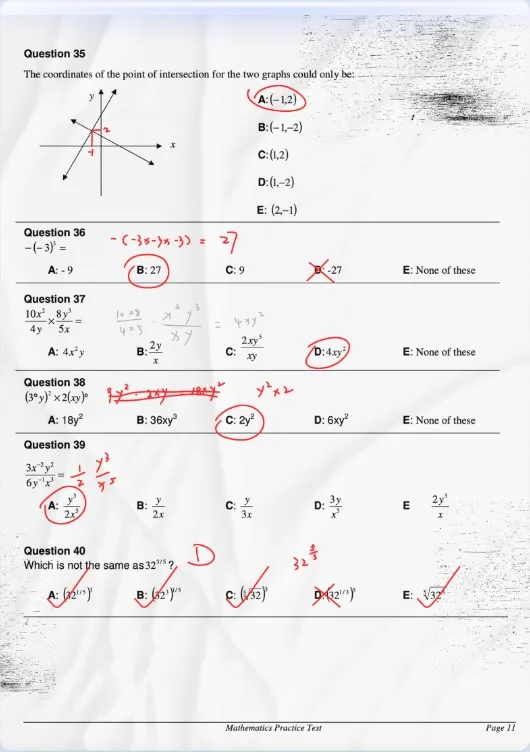
RemoveHandwriting is an AI tool that removes handwriting, pen marks, and annotations from photographs, scans, and PDFs. It is intended for a practical reuse problem: a worksheet, exam paper, form, or template has already been written on, and you need a cleaner copy of the printed page. The tool aims to keep printed text, tables, diagrams, answer lines, and overall layout, but that result is not guaranteed. What you get depends on the source file and the processing mode. You should review the cleaned page before you reuse it.
The main audiences are teachers, students, parents, tutors, and office teams who reprint or reuse their own materials. A teacher may want a fresh copy of a worksheet after students have filled it in. A parent or student may want to practice the same page again. An office may need a filled form returned to a blank template. These are legitimate reuse cases. RemoveHandwriting is not a tool for deleting signatures, ownership marks, or other identifying writing in order to misrepresent a document.
You can use the product on the web and in official iOS and Android apps, with one account and a shared credit balance across those platforms. There is a workflow for a single image, a workflow for multi-page PDFs that supports page preview, page selection, and export back to PDF, and a bulk workflow for image batches. A REST API is available for developers and businesses that want to connect this cleanup into their own systems.
The current official pricing page lists four processing modes, charged in credits per image or PDF page: Standard (1 credit) for everyday handwriting cleanup; Color Fast (3 credits) when color should be kept; Color Scan (3 credits) for color-preserving cleanup with crop and straighten; and AI Rebuild (5 credits), which recreates the entire page. AI Rebuild may change text, formulas, and layout, so that mode in particular needs a careful check. Along with handwriting removal, the tool can detect paper edges, crop away a desk background, straighten a skewed page, and reduce shadows or background noise. These steps can make the output look closer to a fresh scan, but they do not promise a perfect page.
New accounts receive 1 credit at signup. There is a limited free preview or trial of one image or one PDF page, shared across the ordinary image, PDF, and bulk workflows. Downloading or printing a result requires purchased credits and processing the file again. The preview is not unlimited free use. Subscription and credit-pack prices are not listed here; check the official pricing page for current terms.
After processing, check printed text, any marks that may have been missed, formulas, tables, and layout. If handwriting completely covers printed text, that text cannot always be recovered. Blurry photos and pages with heavy glare are harder. Use the preview to decide whether the page is good enough for your purpose.
Real Chinese names, meanings and free name tools
Mingzi is for Mandarin learners, people moving to China, families with Chinese heritage and writers who need a real Chinese name. Browse a curated directory of real names with meanings, convert your English name, or get three names chosen for you. Free tools and guides need no account. Paid options are one-time only: the Naming Agent at US$9.9, and a native-speaking Naming Expert at US$99. Names are chosen for sound, meaning and use, not by fortune-telling. The site is English-only and runs in the browser; there is no app or API.
Chinese namesLanguage LearningEducationName Generator
AI workspace for multi-chapter fanfiction
FicWeave is an AI writing workspace for multi-chapter fanfiction and original fiction. You can generate and read Chapter 1 without an account; the Free plan includes that chapter, 3 starter continuations once, and 1 editable story.
Visualize interior design ideas from room photos with AI.
RoomFloat helps homeowners and design enthusiasts explore interior styles and visualize room redesign ideas from photos using AI.
Bot-free real-time AI meeting assistant with live insights and coaching
OLVA.ai is a bot-free real-time AI meeting assistant with live insights and coaching. It works alongside Zoom, Google Meet, Microsoft Teams, Slack Huddles, Webex, phone calls and in-person conversations without joining as a visible bot.
During meetings, OLVA.ai transcribes speech in 87 languages and regional variants, distinguishes speakers, detects questions automatically and provides contextual answers using the live transcript, attached documents and web search. Live definitions, fact-checks, coaching and quick prompts help users decide what to say next, ask follow-up questions and recap the conversation.
Live translation and dual-language conversation mode support multilingual conversations. Reusable meeting contexts and persistent meeting memory carry relevant information across meetings. After a meeting, users can edit summaries, review decisions and action items, search their history, chat with past meetings and generate editable PowerPoint presentations.
Integrations include Google Calendar, Microsoft Calendar, Google Docs, Google Drive, Notion and outbound webhooks. Apps are available on macOS, Windows, iOS and Android.
AI meeting assistantlive transcriptionmeeting coachingtranslation