Ready-to-print 20 to 300 question OMR answer sheets for MPSC, Police Bharti, TET, Scholarship, NMMS, NEET, and JEE practice tests. No sign-up, no watermarks.
educationomr sheetgenerator
Remove handwriting from worksheets, PDFs and scans with AI
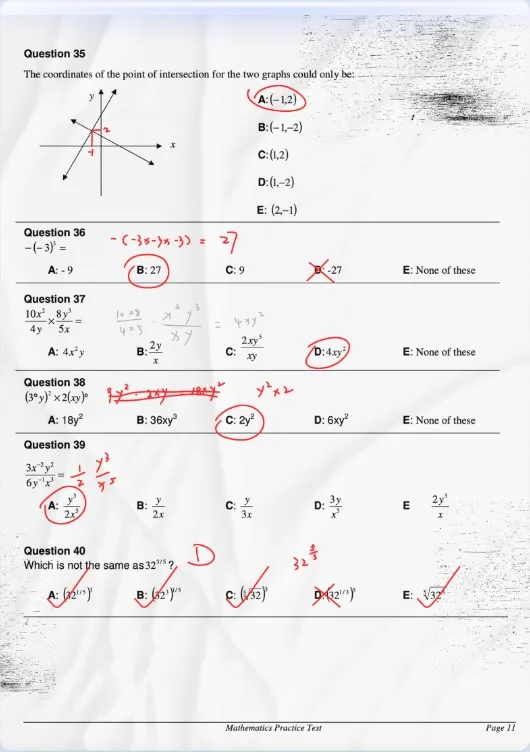
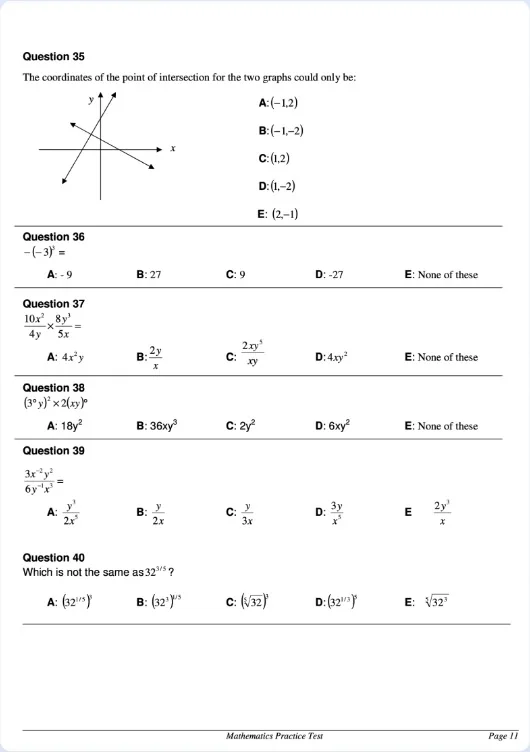
RemoveHandwriting is an AI tool that removes handwriting, pen marks, and annotations from photographs, scans, and PDFs. It is intended for a practical reuse problem: a worksheet, exam paper, form, or template has already been written on, and you need a cleaner copy of the printed page. The tool aims to keep printed text, tables, diagrams, answer lines, and overall layout, but that result is not guaranteed. What you get depends on the source file and the processing mode. You should review the cleaned page before you reuse it. The main audiences are teachers, students, parents, tutors, and office teams who reprint or reuse their own materials. A teacher may want a fresh copy of a worksheet after students have filled it in. A parent or student may want to practice the same page again. An office may need a filled form returned to a blank template. These are legitimate reuse cases. RemoveHandwriting is not a tool for deleting signatures, ownership marks, or other identifying writing in order to misrepresent a document. You can use the product on the web and in official iOS and Android apps, with one account and a shared credit balance across those platforms. There is a workflow for a single image, a workflow for multi-page PDFs that supports page preview, page selection, and export back to PDF, and a bulk workflow for image batches. A REST API is available for developers and businesses that want to connect this cleanup into their own systems. The current official pricing page lists four processing modes, charged in credits per image or PDF page: Standard (1 credit) for everyday handwriting cleanup; Color Fast (3 credits) when color should be kept; Color Scan (3 credits) for color-preserving cleanup with crop and straighten; and AI Rebuild (5 credits), which recreates the entire page. AI Rebuild may change text, formulas, and layout, so that mode in particular needs a careful check. Along with handwriting removal, the tool can detect paper edges, crop away a desk background, straighten a skewed page, and reduce shadows or background noise. These steps can make the output look closer to a fresh scan, but they do not promise a perfect page. New accounts receive 1 credit at signup. There is a limited free preview or trial of one image or one PDF page, shared across the ordinary image, PDF, and bulk workflows. Downloading or printing a result requires purchased credits and processing the file again. The preview is not unlimited free use. Subscription and credit-pack prices are not listed here; check the official pricing page for current terms. After processing, check printed text, any marks that may have been missed, formulas, tables, and layout. If handwriting completely covers printed text, that text cannot always be recovered. Blurry photos and pages with heavy glare are harder. Use the preview to decide whether the page is good enough for your purpose.
Ready-to-print 20 to 300 question OMR answer sheets for MPSC, Police Bharti, TET, Scholarship, NMMS, NEET, and JEE practice tests. No sign-up, no watermarks.
Free BaZi (Four Pillars), Zi Wei Dou Shu and Korean Saju charts in Chinese and Korean, with optional AI-written readings.
Free numerology and tarot calculators that show every step, with optional AI-written readings you can unlock with credits.
Independent reviews and 0-10 scores of AI image, video, audio and writing tools.
Real Chinese names, meanings and free name tools
Search English words in real videos for natural pronunciation